Paste queue & clipboard history for Mac and Windows
Copy once. Paste in order.
The system clipboard keeps only the last item. Queue clips to paste in order, then search history and pin favorites—local-first on macOS and Windows.
VloamClip is a local-first clipboard manager for macOS and Windows. It adds a paste queue (FIFO/LIFO) so you can copy many clips and paste them in order, plus searchable history and favorites. Clipboard data stays on your device; sign in for a 15-day full trial, then unlock with a one-time $5.99 purchase.
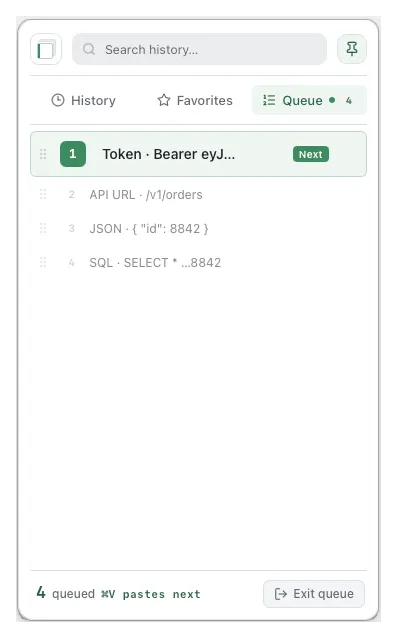
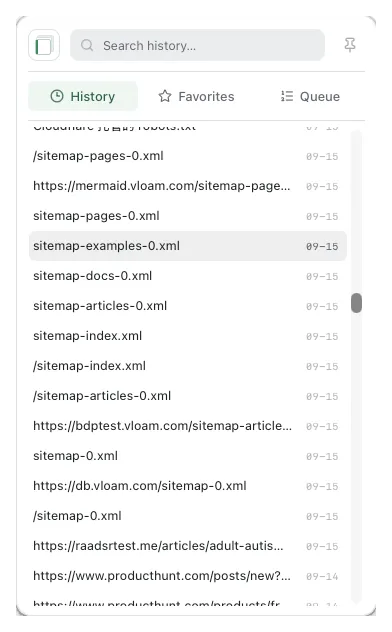
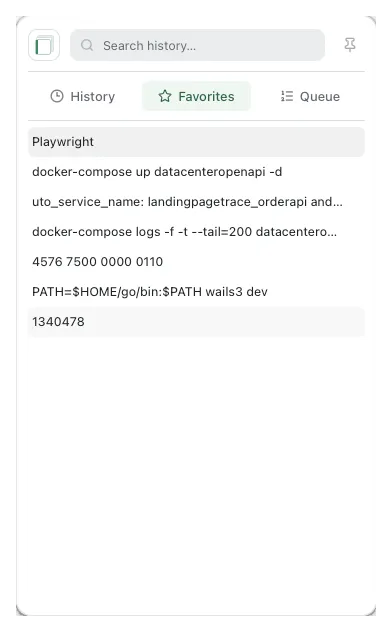
Three tabs in one panel—history for search, favorites for reuse, and Paste Queue for ordered paste.
HISTORY
Search, preview, paste from history
Silently records text you copy. Search filters instantly; single-click copies, double-click pastes into the focused app. Hover or Space for a full preview.
Full-text search · timeline timestamps
Click to copy / double-click to paste
Right-click: favorite, enqueue, delete
FAVORITES
Favorites: reuse what you paste most
Pin ticket replies, SSH hosts, invoice titles, and more. They survive normal history cleanup—grab them from the Favorites tab anytime.
Add / remove favorites
Survives retention cleanup
Same click / double-click paste flow
QUEUE
Paste in the order you copied
Turn on the queue and copies enqueue automatically. In the target app, press ⌘V / Ctrl+V repeatedly—in copy order, or reverse it. Drag to reorder; paste previous reuses the last item.
Copy order (FIFO) · or reverse (LIFO)
Drag reorder · “Next” highlight · footer hint
Paste previous without changing the queue
Built for developers first
Then anyone who pastes the same kinds of clips all day—QA, support, ops, power users.
DevelopersCopy URL, token, JSON, ID, SQL—then paste them in order without hunting history each time.
QA & supportReuse ticket replies, env URLs, and repro steps without overwriting the last copy.
Ops & analystsHosts, queries, and ids stay queued or favorited—less window-switching.
Your clipboard stays yours
Clips live in a local database on your device. No cloud sync of clipboard content. Privacy is why you can trust it with tokens and customer data—not the reason to download.
Import / exportJSON backup for history or favorites-only. Import capped at 20 MiB.
One-time unlock · $5.99
15-day trial after sign-in. Unlock without logging in first—unlock binds to your checkout email.
Now
Pay onceLong-term use
LaterSubscriptionWhen this offer ends
Instant ActivationCard Checkout
$5.99/ one-time
15-day full-featured free trial upon sign-in
License binds directly to your checkout email
Instant automatic activation after payment
Includes all future updates (one-time purchase)
Secure PCI-DSS compliant checkout
Use the same email at checkout and when you sign in to VloamClip.
By continuing to checkout, you agree to the Terms and acknowledge the Privacy Policy.
Payment received. Sign in to VloamClip with the email you used at checkout.
FAQ
Is it free?
Sign in for a 15-day full-app trial. A one-time $5.99 unlock covers long-term use; later we plan to switch to subscription pricing.
How do I pay?
Open Pricing and click Unlock now—that is the only button that starts checkout. You do not need to be signed in. Enter your email at card checkout—that email is unlocked. Then sign in to VloamClip with the same address.
Which account is unlocked after payment?
The email address you enter at checkout. If you already use VloamClip, pay with that same email. A new address creates (or unlocks) that account when you sign in.
Which platforms are supported?
macOS and Windows—use the download buttons on this page. On macOS, grant Accessibility on first launch.
Is clipboard content uploaded?
No. History stays in a local database and is never sent to external servers.
How is this different from the system clipboard?
The system clipboard keeps the last copy. VloamClip adds a Paste Queue so you can paste several clips in the order you copied—plus searchable history and favorites.
Send feedback
Bug report, feature idea, or unlock question — we’ll read every note.
Download and start the trial
macOS and Windows. Sign in for 15 days full access. Ready to unlock? Use Pricing above.